FDIC

Mobile Check Deposit

Introducing Mobile Check Deposit

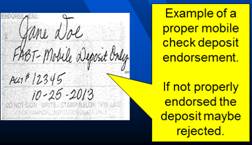
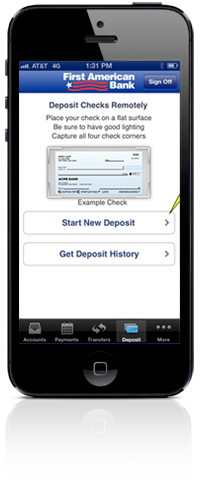
Mobile Deposit Example

Mobile Check Deposit allows you to deposit checks quickly and easily from a smartphone (iPhone® and Android) into a deposit account at First American Bank, by endorsing, photographing and transmitting the check to the bank.

Benefits of Using Mobile Check Deposit

The number one benefit is convenience. Mobile Check Deposit allows you to deposit a check(s) 24 hours a day, 7 days a week.

First American Bank Personal or Small Business customers who have:
  • Enrolled in Mobile Banking, and
  • Have a First American Bank Personal or Small Business checking or savings account, and have
  • An iPhone® or Android smartphone

No. There is no fee for using the Mobile Check Deposit to deposit your checks into a First American Bank checking or savings account. Note: Your mobile carrier's web charges may apply.

  1. A First American Bank personal or small business checking or savings account
  2. A smartphone (iPhone® or Android)
  3. The latest version of First American Bank and Trust app

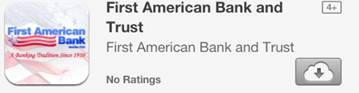
To download the First American Bank and Trust app – Visit the App Store or Google Play store on your smartphone. Search for "First American Bank and Trust" and download it. Icon should look like the one below:

App Store Example


Mobile Check Deposit Instructions:
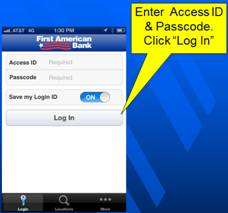
  1. Using your smartphone, log into First American Bank Mobile Banking App
    mobile check deposit step one
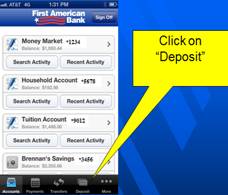
  2. Select the "Deposit" icon at the bottom of the screen
    mobile check deposit step two
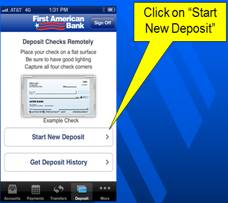
  3. Select "Start New Deposit"
    mobile check deposit step three
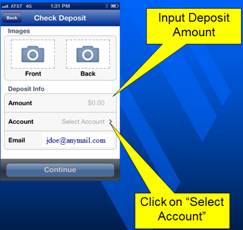
  4. Enter Deposit Info:
    mobile check deposit step four
    • Enter Amount of the Deposit
    • Select Account to be deposited into
    • Enter E-mail address (Optional) to send confirmation receipt
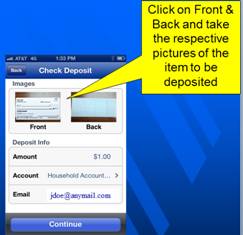
  5. Select "Front" to take a picture of the front of the check – click "OK" if satisfied with picture quality; or you can hit the "X" and retake the picture.
    mobile check deposit step five
    NOTE: When taking an image of a check, please be sure all four corners of the check are in view.
  6. • Select "Back" to take a picture of the back of the check – click "OK" if satisfied with picture quality; or you can hit the "X" and retake the picture.
    mobile check deposit step six
    NOTE: When taking an image of a check, please be sure all four corners of the check are in view.
  7. When all information has been added and you are satisfied with the front and back pictures click on "Continue"
    mobile check deposit step seven
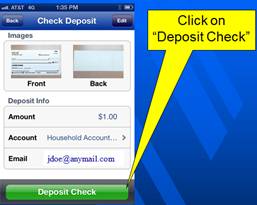
  8. Select "Deposit Check" to confirm and submit your mobile check deposit
    mobile check deposit step eight
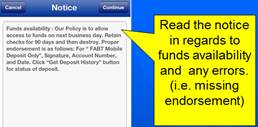
  9. You will be presented with the Funds Availability Disclosure and any errors the system may have detected*
    mobile check deposit step nine
    NOTE: Proper endorsement should include:
    • Your Signature
    • The words "FABT Mobile Deposit Only"
    • The account number deposited into
    • The date the check was deposited
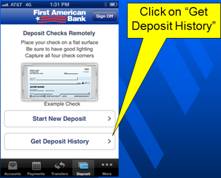
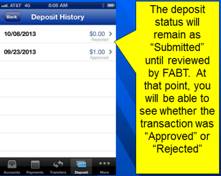
  10. Select "Get Deposit History" to review the status of your deposits
    mobile check deposit step ten


*Most Common Errors:

  • Endorsement on back of check is missing or not proper
  • Item has been deposited before
  • Amount input by the customer does not match the check amount
  • Image quality issues
  • Amount of the check exceeds allowable mobile check deposit limits:
    • Monthly limits – 20 checks per month not to exceed $6,000 (total monthly deposits)
  • The check deposited is an INELIGIBLE ITEM
You may not submit any item which:
  1. Is payable to any other person or entity.
  2. Has been altered, or which you know or should know is fraudulent or unauthorized.
  3. Is dated more than six (6) months prior to the date of your mobile check deposit.
  4. Was remotely created, as described by Reg. CC. (Draft debit item with no maker signature)
  5. Was previously converted to a substitute check, as defined in Reg. CC. (IRD)
  6. Is drawn against an account at a financial institution which is not located within the United States.
  7. Is not payable in the currency of the United States.
  8. Is a Money Order or Traveler's Check.

 ^ return to top

Checks may be deposited at any time, however, in order to be processed on the same business day, the deposit must be submitted by 4:30 p.m. Central Standard Time.

 ^ return to top

For each deposit, a deposit receipt notification from monitor@ensenta.com can be sent to your email address.

 ^ return to top

On a normal business day, deposits must be received by 4:30 P.M. CST to receive same day processing.  Funds will normally be available on the next business day. However, FABT reserves the right to place a hold on any item deposited VIA Mobile Deposit, if it does so, your funds will not be available on the next business day.

 ^ return to top

You should write the words "MOBILE DEPOSITED ON (date)" across the front of the check, store it in a secure location for 90 days, and then shred it or otherwise securely destroy it.

 ^ return to top

An image of the check goes to the bank, and we begin the normal process of collecting the money from the checks maker.

 ^ return to top

At First American Bank our goal is to protect the integrity of your account. While we make every effort to safeguard your information, there are steps you should take to protect yourself and your account:

  • Do not throw the checks out with the trash.
  • Do not keep the originals in a file folder for an indefinite period of time.
  • 90 days after the original check has been successfully imaged and processed, it should be destroyed. Why? Checks are like cash. They should be treated as negotiable instruments.

 ^ return to top

Please contact us at (800) 738-2265 or visit a First American Bank branch location near you.

 ^ return to top

Notify Me Alerts
Notify Me Alerts

If you are an Online Banking Customer, sign up for Notify Me Alerts on your accounts to minimize account fraud and ID theft.

Debit Card Alerts
Debit Card Alerts

Receive near real-time alerts about your debit card activity. You may set custom alerts to be sent to your mobile phone and email address.

Benefits
Benefits:
  • Free mobile banking
  • Free online banking
  • Unlimited teller visits
  • Unlimited check writing
  • Free phone banking
Bank sign
Contact Us

Contact us with any questions you may have. Send us an email and we will get back to you as soon as possible with the answers you need.

Open a New Account Online